AWS Beanstalk Setup
Introduction
While my time in military service I got to know a colleague who programmed an expenses and accounting web application for his dad. As his dad's bussines has some special use cases this special tool was developed. He then first deployed it via Railway. As he wanted to reduce costs and make it scalable for later use cases, we then moved the setup to AWS.
Here I documented the AWS setup (of course without referencing the tool and with the agreement of him and his dad). The project was not extremely complex but still very interesting and I thought worth documenting.
For the sake of documentation I will call the application "Accountingapp"
Setup
AWS
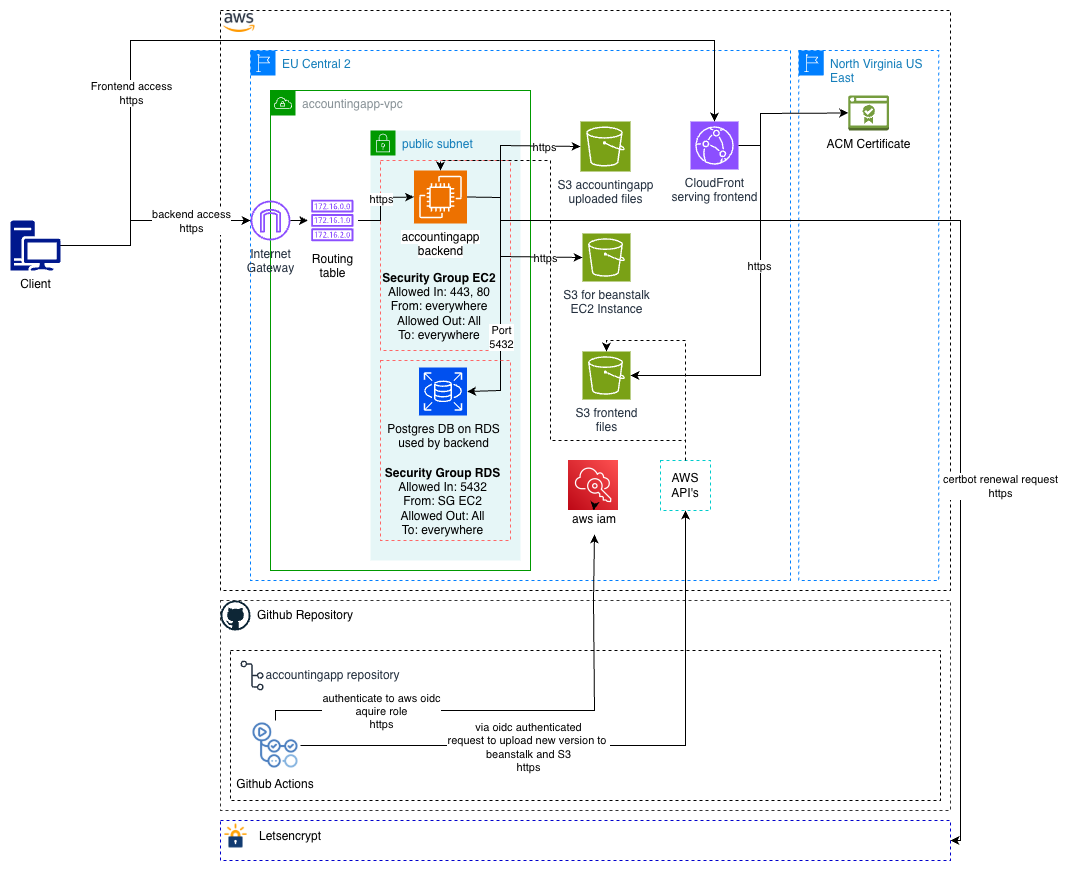
The app consists of a python Flask RestAPI Backend and a VueJS Frontend. The backend is deployed on the AWS EB (Elastic Beanstalk) instance. To let EB create and manage the environment, a few IAM roles (and an instance profile) are required which configure the permissions to create the instance. These contain the default predefined values. The role aws-elasticbeanstalk-ec2-role-production was expanded with the permission to let the backend access the file-upload S3 storage which will be later mentioned.
The EB instance is deployed into a VPC created for the Accountingapp. The VPC contains three public subnets, each in its own availability zone. The EC2 instance gets deployed into one of them. The instance also gets a public IP so it can be accessed from the internet. Right now only vertical autoscaling is configured. If at some later point in time horizontal autoscaling is activated, the new EC2 instances will be deployed into these other availability zones. To store configuration data logs and more a S3 bucket is also automatically created for the EC2 instance on EB deployment.
The backend also requires a RDS Postgres database. This database is deployed into the same VPC. Both the database and EB have a security group to control network access and are configured like following:
EB Security Group
Allow In:
- Port 80 from anywhere
- Port 443 from anywhere
Allow Out:
- Everything
Database Security Group
Allow In:
- 5432 from the EB Security Group
Allow Out:
- Everything
To allow access from and into the internet from/to the EC2 instance an Internet Gateway as well as the necessary Routing Tables are required. The Internet Gateway is basically the bridge between the internet and the VPC. To enable secure connections via https to the backend on deployment it also requests a TLS certificate via Letsencrypt. After deployment once a day at midnight the backend checks if the certificate is due for renewal and if so renews the certificate automatically.
As the user can upload files in the Accountingapp the backend stores these files in another S3 bucket as mentioned earlier. These permissions were given in the role aws-elasticbeanstalk-ec2-role-production, referenced earlier.
The frontend is a static web application. To make the setup simple the files are stored in yet another S3 bucket. To serve the frontend to the Internet Cloud Front is deployed. It is configured to serve the files from the bucket. Cloud Front also has the advantage that it caches the files and serves them to the user via the closest geographical region of the user. To enable secure connections via https a TLS certificate had to be created. This certificate was created in the AWS Certificate Manager. Note: This is the only component in this setup not in the EU Central 2 region (Zürich) as AWS requires the certificate to be created in the region North Virginia US East. This certificate is as well automatically renewed, this time from AWS itself.
Finally if a client accesses the Accountingapp, the frontend is accessed via Cloud Front and the backend directly via the EC2 instance.
GitHub
To upgrade the application, GitHub Actions is used. When a new release is pushed to the main branch two preconfigured GitHub Actions pipelines are run. On AWS IAM GitHub was added as an OIDC provider and a role was created named GitHubActions-Accountingapp-ProductionRole. This role contains following config:
- It allows GitHub to configure the EB instance and upload files to the frontend S3 bucket.
- It only allows GitHub to request the credentials for this role if the request is coming from the correct repository and branch.
There are two pipelines, one for the frontend and one for the backend.
When the frontend pipeline is run, it requests an OIDC token from GitHub's OIDC Provider. AWS validates this token. Then the workflow requests temporary credentials in exchange for the OIDC token for the GitHubActions-Accountingapp-ProductionRole AWS role. If the request is coming from the correct repository and branch then the request is accepted. All following actions are performed via the AWS API. The workflow uses the credentials to upload the frontend files to the S3 frontend bucket and then invalidates the Cloud Front cache so the updated files can be loaded into the cache.
For the backend pipeline the authentication process is the same. Then the backend files are zipped. This zipped folder is then deployed to the EB instance via the AWS API.
Backup
Every day between 03:00am and 03:30am a snapshot of the database is made. A snapshot is kept for 7 days and can be restored inside that time window.
For the S3 bucket versioning was enabled. For this a lifecycle policy was created. It defines that a version backup older than 90 days is deleted. It also contains some technical cleanup rules. So if a file is changed or deleted the last state is kept in the bucket for 90 days and can also be restored for that time.